Detailed Understanding of Azure WAF

Azure Well-Architected Framework:

The Azure Well-Architected Framework is like a guideline or best practice manual for building and maintaining cloud solutions on Azure. It's divided into five main areas:

  1. Cost Optimization: Making sure you're not overspending; getting the most out of what you pay.
  2. Operational Excellence: Ensuring things run smoothly, efficiently, and with minimal errors or outages.
  3. Performance Efficiency: Making sure your solutions are fast and responsive, not laggy or slow.
  4. Reliability: Ensuring your applications and services are available and dependable, minimizing downtime.
  5. Security: Keeping everything safe, protecting data and systems from threats and breaches.

By following the advice in this framework, you can ensure that your Azure solutions are efficient, reliable, secure, and cost-effective.

Lets explore each one of these pillars in detail with examples and recommendations:


Reliability in the Azure Well-Architected Framework:

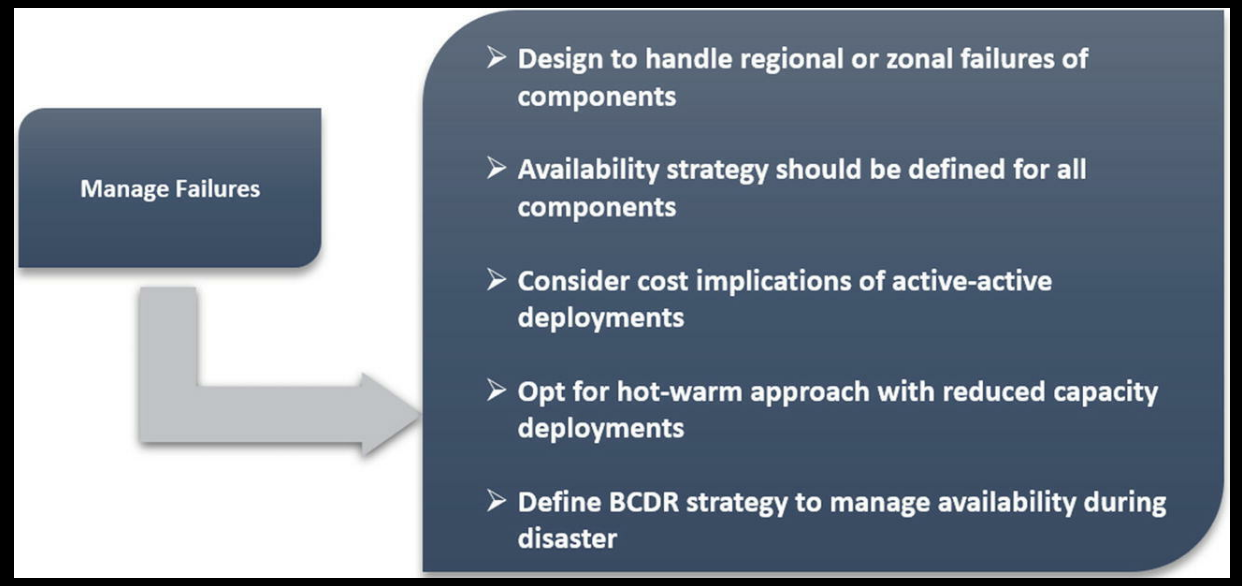
  1. Design for Recovery: Understand that failures can happen. Instead of just trying to prevent them, also design your solutions to recover from them gracefully.
  2. Test for Reliability: Periodically introduce faults or simulate failures in your system to ensure your reliability strategies are effective.
  3. Measure and Monitor: Constantly track the reliability of your systems. This includes monitoring uptime, failover success rates, and other relevant metrics.

Options or Recommendations to Achieve Reliability in Azure:

  1. Redundancy and Failover:
    • Azure Availability Zones: Ensure your VMs, databases, and other critical services are spread across multiple availability zones. This ensures that if one zone faces an outage, your application can continue to function using resources in another zone.
    • Example: Deploy your VMs across multiple availability zones, so if one datacenter in a region faces a power outage, your application isn't affected as VMs in another zone can handle the load.
  2. Backup and Disaster Recovery:
    • Azure Site Recovery: It provides disaster recovery capabilities. If your primary data center or region fails, it can failover to a secondary site, ensuring application availability.
    • Azure Backup: Regularly back up VMs, databases, and other critical resources. In case of data corruption or accidental deletions, you can restore from a backup.
    • Example: If your application's database gets corrupted, having a backup in Azure Backup allows you to restore it to a known good state.
  3. Scalability:
    • Azure Autoscale: Automatically scale resources based on demand. If a sudden spike in traffic threatens to overwhelm your services, Autoscale can automatically deploy additional resources to handle the load.
    • Example: If your e-commerce site has a sale, and there's a surge in users, Autoscale can automatically increase the number of VM instances to handle this surge, ensuring the website remains responsive.
  4. Monitoring and Alerts:
    • Azure Monitor: Constantly track the health and performance of your resources. If there's an anomaly that could indicate a reliability issue, Azure Monitor can alert you.
    • Azure Application Insights: Monitor the live performance of your web applications, detect anomalies, and get detailed telemetry.
    • Example: If a critical service like a database has a high error rate, Azure Monitor can send an alert, prompting immediate action to investigate and resolve the issue.
  5. Network Resilience:
    • Azure Traffic Manager: Distribute incoming traffic across multiple regions or data centers, providing high availability and resilience.
    • Azure Load Balancer: Balance inbound and outbound traffic to applications, ensuring the application remains responsive and available.
    • Example: If your application is deployed in multiple regions, Traffic Manager can route users to the nearest operational instance, ensuring they have a smooth experience even if one region has issues.
  6. Storage Redundancy:
    • Azure Blob Storage Redundancy: Options like Locally Redundant Storage (LRS), Geo-Redundant Storage (GRS), and Zone-Redundant Storage (ZRS) ensure your data remains available in case of failures.
    • Example: By storing critical data with GRS, even if there's a major disaster in one region, your data is safe as it's replicated in another secondary region.

By implementing these strategies and tools, reliability can be significantly enhanced, ensuring your Azure solutions remain available and resilient to a wide range of potential issues.


Operational Efficiency in the Azure Well-Architected Framework:

  1. Automate Repeatable Tasks: Automating routine and repetitive tasks eliminates the manual effort and reduces the risk of human error.
  2. Reduce Complexity: Using platform-managed services and adopting standard conventions help in simplifying the infrastructure, making it easier to manage.
  3. Continuously Improve Operations: By monitoring, collecting feedback, and analyzing system behavior, one can iteratively refine operations to ensure optimal performance.

Options or Recommendations to Achieve Operational Efficiency in Azure:

  1. Infrastructure as Code (IaC):
    • Azure Resource Manager (ARM) Templates: Define and deploy infrastructure using code. This ensures consistency across environments and allows for automated and repeatable deployments.
    • Example: If you have a web application that requires specific configurations, using an ARM template ensures that every time it's deployed, it's set up correctly, reducing manual setup errors.
  2. Deployment Automation:
    • Azure DevOps: Use Azure Pipelines for Continuous Integration and Continuous Deployment (CI/CD). This automates the build, test, and deployment processes, ensuring consistent and rapid delivery.
    • Example: Every time a developer pushes code to the repository, Azure Pipelines can automatically test and deploy it to a staging environment, reducing manual intervention.
  3. Use Managed Services:
    • Azure SQL Database: Instead of managing your SQL server, use Azure's managed SQL service, which takes care of patching, backups, and scaling.
    • Azure App Service: Host web applications without worrying about the underlying infrastructure.
    • Example: By using Azure SQL Database, you no longer need to manually patch or backup the server, freeing up operational time.
  4. Monitoring and Management:
    • Azure Monitor and Azure Log Analytics: Collect, analyze, and act on telemetry data from your Azure resources. Understand how applications are running and where bottlenecks exist.
    • Azure Automation: Automate frequent, time-consuming, and error-prone cloud management tasks.
    • Example: If Azure Monitor detects high CPU usage on a VM for a prolonged period, Azure Automation can be set up to automatically restart the VM or send an alert.
  5. Feedback Loop:
    • Azure Application Insights: Get actionable insights into how well your application is performing and where enhancements are needed.
    • Example: If Application Insights shows a specific API endpoint takes too long, developers can be alerted to optimize that part of the application.
  6. Optimize & Refine:
    • Azure Advisor: It gives personalized best practices and recommendations. Regularly review its suggestions to refine and optimize your operations.
    • Example: Azure Advisor might recommend setting up auto-scaling on a VM based on observed traffic patterns, ensuring operational efficiency during high traffic spikes.
  7. Unified Management:
    • Azure Portal and Azure Mobile App: Centralize management tasks. Monitor the health and status of your resources, respond to alerts, and troubleshoot issues.
    • Example: If you're away from your workstation and receive an alert about a critical service, you can use the Azure Mobile App to quickly investigate and take action.


By leveraging the above strategies and tools in Azure, operational efficiency can be significantly enhanced. The aim is to reduce manual overhead, increase consistency, and quickly adapt to operational needs using the provided Azure toolset.


Performance Efficiency in the Azure Well-Architected Framework:

  1. Rightsize Resources: Allocate the right amount of resources based on workload requirements.
  2. Optimize to Scale: Ensure systems can handle growth in users, traffic, or data.
  3. Minimize Latency: Reduce the delay in data processing to ensure quick responses.

Options or Recommendations to Achieve Performance Efficiency in Azure:

  1. Rightsize Resources:
    • Azure Cost Management and Azure Advisor: These tools can provide recommendations for resizing underutilized VMs or other resources. Resizing ensures you're not over-provisioning (which leads to higher costs) or under-provisioning (which can impact performance).
    • Example: Azure Advisor may suggest downsizing a VM if it notices consistently low CPU and memory usage.
  2. Scalability Solutions:
    • Azure Kubernetes Service (AKS): For containerized applications, AKS allows for dynamic scaling, efficiently adjusting resources based on demand.
    • Azure Autoscale: For VMs, App Services, and other resources, Autoscale adjusts the number of instances in real-time based on traffic patterns.
    • Example: If you run an e-commerce platform, and there's a sale, Autoscale can automatically increase instances to handle the surge in users, ensuring the platform remains responsive.
  3. Optimize Data Storage:
    • Azure Blob Storage with Hot, Cool, and Archive tiers: Store data based on access patterns. Frequently accessed data can be in the 'Hot' tier, while infrequently accessed data can be in 'Cool' or 'Archive' tiers.
    • Azure Premium SSDs: For high-performance, low-latency disk support, especially critical for I/O-intensive operations.
    • Example: A content delivery platform can use the 'Hot' tier for trending videos, while older, less-viewed content can be moved to 'Cool' or 'Archive'.
  4. Minimize Network Latency:
    • Azure Content Delivery Network (CDN): Distribute content across multiple locations globally, ensuring users fetch data from the nearest point, reducing latency.
    • Azure Proximity Placement Groups: This is used to ensure that interdependent Azure VMs are located close to each other in the same data center.
    • Example: A streaming service can use Azure CDN to ensure that viewers retrieve the video stream from the closest server, ensuring smooth playback without buffering.
  5. Database Optimization:
    • Azure SQL Database Performance Tiers: Choose between General Purpose, Business Critical, or Hyperscale depending on your needs. Use In-Memory OLTP for high-throughput, low-latency data processing.
    • Azure Cosmos DB: A globally distributed, multi-model database service for large-scale applications with a need for wide-reaching scalability and geographic distribution.
    • Example: An online gaming leaderboard, which requires quick reads and writes, can benefit from Azure Cosmos DB's low-latency data access.
  6. Caching for Performance:
    • Azure Redis Cache: Use this managed caching service to reduce the need to fetch data from the primary store repeatedly, increasing speed and reducing database load.
    • Example: An online marketplace can cache product listings and prices in Azure Redis Cache to quickly serve repeated requests without querying the primary database every time.
  7. Optimized Data Processing:
    • Azure Data Lake Storage and Azure Databricks: For big data processing tasks, these services provide fast, optimized, and scalable data processing capabilities.
    • Example: A weather forecasting application can process large datasets of weather patterns quickly using Azure Databricks and store the processed data efficiently in Azure Data Lake Storage.
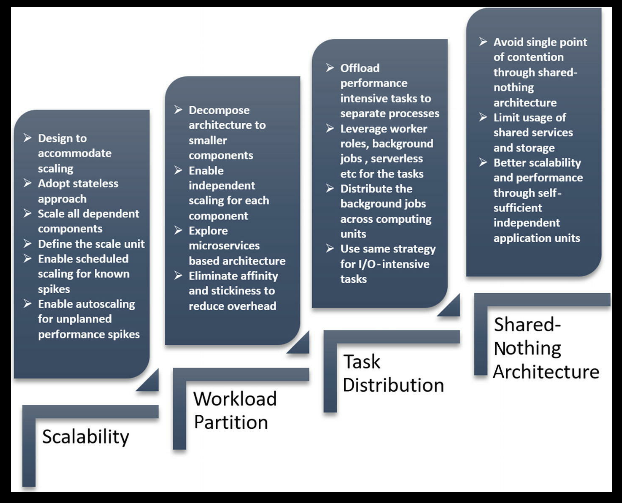


By adopting these strategies and tools, you can ensure that your Azure solutions not only meet but excel in performance expectations, delivering consistent, fast, and efficient results to users.

Security in the Azure Well-Architected Framework:

  1. Protect Information & Data: Safeguarding sensitive data against unauthorized access and breaches.
  2. Control Access: Ensure that only authorized users and applications can access resources.
  3. Protect Systems: Defend systems and resources from threats and vulnerabilities.
  4. Ensure Confidentiality & Integrity: Ensuring that data is not tampered with and is accessible only to those with the right permissions.

Options or Recommendations to Achieve Security in Azure:

  1. Identity & Access Management:
    • Azure Active Directory (AAD): Azure's identity service providing features like Single Sign-On (SSO), multi-factor authentication, and identity governance.
    • Example: A company can use AAD to ensure employees access Azure resources using their corporate credentials, with added security layers like multi-factor authentication.
  2. Protect Data:
    • Azure Key Vault: Store and manage cryptographic keys, secrets, and certificates used by cloud applications and services.
    • Azure Disk Encryption: Use Azure AD and Key Vault to encrypt your VM disks.
    • Example: If an application needs to store API keys or connection strings, rather than hard-coding them, they can be securely stored in Azure Key Vault.
  3. Network Security:
    • Azure Network Security Groups (NSG): Use NSGs to filter network traffic to and from Azure resources in an Azure virtual network.
    • Azure Application Gateway WAF: A web application firewall that provides centralized protection for web applications from common threats and vulnerabilities.
    • Example: An e-commerce site can use Azure Application Gateway WAF to guard against SQL injection or cross-site scripting attacks.
  4. Data Protection and Privacy:
    • Azure Confidential Computing: Encrypts data in use, ensuring that data being processed is protected against malicious insiders or software vulnerabilities.
    • Azure Policy and Blueprints: Define and enforce organizational requirements, ensuring resources are compliant with standards.
    • Example: A health service using Azure can set up Azure Policies to ensure all stored patient data is encrypted at rest.
  5. Security Management and Monitoring:
    • Azure Security Center: Provides unified security management, advanced threat protection, and security recommendations based on your configurations.
    • Azure Sentinel: A scalable, cloud-native security information event management (SIEM) solution.
    • Example: For a financial institution, Azure Security Center can monitor its Azure resources and provide alerts for suspicious activities, like unusual data access patterns.
  6. Application Security:
    • Azure DevOps: Implement security checks in your CI/CD pipelines, ensuring vulnerabilities are caught during development.
    • Application Insights: Monitor live applications, detect anomalies and security incidents.
    • Example: A software firm can integrate security scanning tools within Azure DevOps, so every code push gets scanned for potential vulnerabilities.
  7. Endpoint Protection:
    • Azure Endpoint Protection: Protect against software vulnerabilities with security features built directly into your Azure VMs.
    • Example: A company hosting its applications on Azure VMs can enable Azure Endpoint Protection to guard against potential malware.


By implementing these recommendations, you can fortify your Azure environment, reducing risks and ensuring that your data, applications, and resources are protected against an ever-evolving landscape of threats.


Cost Optimization in the Azure Well-Architected Framework:

  1. Cost-Effective Resources: Ensure that you're using the most cost-effective resources for your workloads.
  2. Cost Monitoring & Analysis: Regularly analyze and monitor costs to ensure that you're within budget and to spot any unexpected expenses.
  3. Optimize Unused or Underutilized Resources: Regularly review and adjust resources that are no longer needed or that are over-provisioned.
  4. Predict & Budget Costs: Forecast future costs and set up budgets and alerts.

Options or Recommendations to Achieve Cost Optimization in Azure:

  1. Rightsize & Scale Resources:
    • Azure Cost Management + Billing: This tool provides detailed insights into your expenditure, helping you identify underutilized resources. It also provides cost allocation and invoicing capabilities for internal chargebacks.
    • Azure Advisor: It gives personalized best practices and recommendations, which can include resizing or shutting down underutilized VMs to save costs.
    • Example: If you provisioned D-series VMs but consistently use only a fraction of their capacity, Azure Advisor might recommend downsizing to B-series VMs to reduce costs.
  2. Use Reserved Instances:
    • Azure Reserved VM Instances (RIs): By pre-committing to VMs for a 1 or 3-year term, you can save up to 72% over pay-as-you-go prices.
    • Azure Blob Storage Reserved Capacity: Offers discounted rates in return for committing to a certain amount of storage capacity for a period.
    • Example: If you're running a database that you know will be in operation for the next 2 years, purchasing a reserved instance can significantly reduce costs compared to the pay-as-you-go model.
  3. Cost Monitoring & Alerts:
    • Azure Budgets: Set up budgets for specific resources, resource groups, or services and get alerted when you approach or exceed the budget.
    • Example: If you have a monthly budget of $1000 for development environments, set an alert at 80% ($800) to ensure you get notified before overspending.
  4. Take Advantage of Azure Hybrid Benefit & Licensing:
    • Azure Hybrid Benefit: Allows customers with Software Assurance to use their on-premises Windows Server and SQL Server licenses on Azure, leading to significant savings.
    • Example: A company migrating its on-premises SQL Server to Azure SQL can use Azure Hybrid Benefit to reduce the costs of SQL licensing on Azure.
  5. Delete Unused Resources:
    • Regularly review and delete unused resources such as VMs, storage, or databases that are no longer needed.
    • Example: A development environment that was set up for a project that has ended can be de-provisioned to stop incurring charges.
  6. Use Cost-effective Storage Solutions:
    • Azure Blob Storage tiers (Hot, Cool, and Archive): Store data based on access patterns. Frequently accessed data can be in the 'Hot' tier, while infrequently accessed data can be moved to 'Cool' or 'Archive' for cost savings.
    • Example: A media company can move older video content that's infrequently accessed to the 'Cool' or 'Archive' tier, while new content that's frequently accessed remains in the 'Hot' tier.
  7. Optimize Data Transfer:
    • Azure Content Delivery Network (CDN): Reduce costs by caching content at strategic locations, reducing the need to fetch data from the origin server frequently.
    • Example: An international news website can use Azure CDN to cache articles, ensuring readers worldwide access content from a nearby location, reducing data egress costs from the primary server.
By actively monitoring, analyzing, and adjusting your Azure resources with these strategies, you can optimize costs, ensuring that you're only paying for what you need while still meeting all your workload requirements.


Let's Understand the customer requirement to prepare the Azure DevOps Solution.

In this article we will go through alot of questions and examples in order to understand the customers requirement which will help us to build the best solution for the customer.


 Source Control (Version Control) Explanation:

Source Control, also known as Version Control, is a system that tracks changes to a set of files over time. It allows multiple users to collaborate on a project without interfering with each other's changes. Source control systems provide a history of changes, enable the retrieval of any previous version of the code, facilitate branching and merging, and ensure the integrity and traceability of code throughout the software development life cycle. Popular source control systems include Git, Subversion (SVN), Mercurial, and Team Foundation Version Control (TFVC).

Questions on Source Control for Azure DevOps:

1. Current Source Control Setup:

  • What version control system are you currently using? Example: "Are you working with Git, SVN, Mercurial, TFVC, or another system?"
  • Where is your code currently hosted? Example: "Do you use GitHub, Bitbucket, a self-hosted server, or another platform for code hosting?"

2. Repository Organization:

  • How are your repositories organized? Example: "Do you use a monorepo (one large repository) or have multiple repositories for different components or services?"
  • How do you handle large files or binary data in your source control? Example: "Do you use Git LFS (Large File Storage) or a separate system to manage large files?"

3. Branching and Merging:

  • What branching strategy do you follow? Example: "Do you utilize feature branches, main/master branch, release branches, and hotfixes? Or do you follow a Git Flow or trunk-based development approach?"
  • How often do you merge branches, and what's the typical process? Example: "Do developers merge daily, or is there a specific release process?"

4. Collaboration and Workflows:

  • How many developers collaborate on your repositories? Example: "Do you have a few core developers, or is it a large team with 50+ contributors?"
  • How do you handle code reviews and pull/merge requests? Example: "Is there a mandatory review process? How many reviewers are typically required?"

5. Continuous Integration (CI) and Continuous Deployment (CD):

  • Is your source control integrated with any CI/CD tools? Example: "Once code is committed, are there automated builds or deployments triggered?"
  • Do you link work items or tickets with source control commits? Example: "When a developer fixes a bug, do they link their commits to a specific bug ticket?"

6. Access Control and Security:

  • How do you manage access to your repositories? Example: "Do all developers have write access, or is it restricted based on teams or roles?"
  • Are there any security practices in place for your code? Example: "Do you perform code scanning, require signed commits, or have policies against committing sensitive data?"

7. History and Traceability:

  • How important is commit history and traceability for your projects? Example: "Do you need a clean linear history, or are developers free to commit as they see fit?"
  • Do you utilize any tools or practices to keep commit history clean? Example: "Do you squash commits, rebase frequently, or use other practices to maintain a tidy commit history?"

8. Future Goals and Pain Points:

  • What challenges or limitations are you facing with your current source control setup? Example: "Is the repository too large, causing slow clones? Or are there challenges with merge conflicts?"
  • What improvements or features are you seeking with a new source control solution in Azure DevOps? Example: "Are you looking for better integration with CI/CD tools, enhanced security features, or improved collaboration tools?"

These questions, once answered, will give you a comprehensive view of the client's source control landscape and will assist in tailoring a solution within Azure DevOps that best meets their needs.


Azure Pipelines Explanation:

Azure Pipelines is a cloud service that is part of the Azure DevOps suite. It provides CI/CD capabilities that can be used to automatically build, test, and deploy applications to various target platforms. These pipelines can work with a variety of languages, platforms, and cloud providers. The key features include the ability to define pipeline as code using YAML, integration with popular repositories like GitHub, and support for containers and Kubernetes.

Questions on Azure Pipelines:

1. Current CI/CD Setup:

  • What CI/CD tools are you currently using? Example: "Are you using Jenkins, Travis CI, CircleCI, or another solution for your build and deployment processes?"
  • Can you walk through your current build, test, and deployment process? Example: "Once a developer commits code, what automated processes kick in, and how is the code eventually deployed to production?"

2. Source Control Integration:

  • Which version control system(s) do you use? Example: "Is your code hosted on GitHub, Azure Repos, Bitbucket, or another platform?"
  • How frequently do developers push code changes? Example: "Do developers commit multiple times daily, or is there a weekly release cycle?"

3. Build Process:

  • Describe the build process for your applications. Example: "Do you compile code, run linters, or create container images during the build stage?"
  • What build tools and scripts are currently in use? Example: "Are you using tools like Maven, Gradle, npm, or webpack in your build process?"

4. Automated Testing in Pipelines:

  • Do you have automated tests that run as part of your CI/CD pipeline? Example: "Are unit tests, integration tests, or end-to-end tests executed automatically during the pipeline?"
  • Which testing frameworks or tools do you utilize? Example: "Are your tests written using JUnit, NUnit, Selenium, or another framework?"

5. Deployment & Environments:

  • To which environments do you deploy your applications? Example: "Do you have development, staging, QA, and production environments?"
  • Describe any deployment strategies you employ. Example: "Do you use blue-green deployments, rolling updates, or canary releases?"

6. Container & Orchestration:

  • Do you use containers in your application lifecycle? Example: "Is your application packaged into Docker containers?"
  • If you use Kubernetes or another orchestrator, how is it integrated into your pipeline? Example: "Do you use Azure Kubernetes Service (AKS) or another Kubernetes distribution, and how do you deploy to it?"

7. Security & Compliance in Pipelines:

  • How do you handle secrets or sensitive data in your pipelines? Example: "Are secrets stored in Azure Key Vault, environment variables, or another secure manner?"
  • Do you have any compliance checks or security scans as part of the pipeline? Example: "Do you use tools to scan for security vulnerabilities in your code or container images?"

8. Monitoring & Feedback:

  • How do developers and operations teams get feedback from the pipeline? Example: "If a build fails or a deployment encounters an issue, how are teams notified?"
  • Do you monitor deployed applications for performance, errors, or other metrics? Example: "Do you integrate with monitoring solutions like Azure Monitor, Application Insights, or third-party tools?"

9. Infrastructure as Code (IaC):

  • Do you utilize Infrastructure as Code in your CI/CD processes? Example: "Are cloud resources provisioned using tools like ARM templates, Terraform, or Ansible as part of the pipeline?"

10. Future Goals & Challenges:

  • What challenges or bottlenecks are you facing in your current CI/CD process? Example: "Is the build process slow, or are there manual steps that cause delays?"
  • What improvements or capabilities are you aiming to achieve with Azure Pipelines? Example: "Are you looking for faster build times, improved deployment strategies, better integration with Azure services, or other specific features?"

These questions, when addressed, will give you a comprehensive understanding of the client's CI/CD landscape. This insight will be invaluable when setting up and optimizing Azure Pipelines to meet their specific needs and objectives.


Test Plans in Azure DevOps Explanation:

Azure DevOps "Test Plans" provides a comprehensive solution for testing your applications. It allows you to manage both manual test cases and automated test scripts. With Test Plans, you can create, manage, and run tests directly within the Azure DevOps environment. It integrates seamlessly with the rest of the Azure DevOps suite, ensuring that testing is an integral part of your CI/CD pipeline. Key features include the ability to capture rich data during test execution, reuse test cases and parameters, and generate detailed insights with analytics.

Questions on Test Plans in Azure DevOps:

1. Current Testing Setup:

  • Which tools or platforms are you currently using for test management? Example: "Are you using tools like TestRail, QTest, or managing test cases in Excel?"
  • How are your test cases currently documented and executed? Example: "Do you maintain a wiki, shared documents, or use a dedicated test management tool?"

2. Test Case Management:

  • How many test cases do you manage on average for a project or release? Example: "Do you have hundreds of test cases per project, or is it more in the thousands?"
  • Do you utilize any test case templating or reuse mechanisms? Example: "Do you often copy test cases between projects or utilize templated steps?"

3. Test Execution & Environments:

  • Describe the environments where testing is performed. Example: "Do you have dedicated QA, pre-production, or staging environments?"
  • How do you manage test data and configurations for these environments? Example: "Do you use synthetic test data, anonymized production data, or other methods?"

4. Automation Integration:

  • Do you have automated tests, and how are they integrated into your testing process? Example: "Do you run automated Selenium tests after manual test execution or as part of your CI/CD pipeline?"
  • Which automation frameworks or tools are you currently utilizing? Example: "Are you working with frameworks like JUnit, NUnit, TestNG, or tools like Appium?"

5. Reporting & Metrics:

  • What kind of test metrics and reports are essential for your team or stakeholders? Example: "Do you require pass/fail rates, defect metrics, test coverage, or other specific reports?"
  • How frequently are these reports reviewed and by whom? Example: "Are metrics reviewed after every sprint, release, or on a different cadence? Who are the primary stakeholders reviewing them?"

6. Defect Tracking & Integration:

  • How do you track defects found during testing? Example: "Do testers log bugs directly into Azure Boards, JIRA, or another system?"
  • Is there an integration between your test management and defect tracking tools? Example: "If a tester finds a defect, can they link it directly to a test case or requirement?"

7. Collaboration:

  • How do testers collaborate with developers, product owners, and other stakeholders? Example: "Do testers and developers meet regularly to discuss found defects? Is there a process for triaging and prioritizing bugs?"

8. Future Goals & Pain Points:

  • What challenges or limitations are you facing with your current test management process? Example: "Is it challenging to maintain test cases, gather accurate metrics, or something else?"
  • What improvements or functionalities are you hoping to achieve with Azure DevOps Test Plans? Example: "Are you aiming for tighter integration between test cases and source code, better reporting, or some other specific features?"

By understanding the answers to these questions, you'll have a comprehensive view of the client's testing landscape. This will be invaluable for setting up Azure DevOps Test Plans to meet their specific needs and streamline their testing processes.


Azure Artifacts Explanation:

Azure Artifacts is a feature of Azure DevOps that allows you to manage, host, and share packages with your team and other developers. These packages can be Maven, npm, NuGet, and Python packages. Think of it as your private package repository integrated directly into Azure DevOps. With Azure Artifacts, you can integrate your package sharing into your CI/CD pipelines, ensuring that you always have access to the components you need and that you can share them securely with others.

Questions on Azure Artifacts:

1. Current Package Management:

  • Which package management tools or repositories are you currently using? Example: "Do you use npm for Node.js, NuGet for .NET, Maven for Java, or others?"
  • How do you currently store and share these packages? Example: "Are you using public repositories like npmjs.com or NuGet Gallery, or private repositories like Nexus or Artifactory?"

2. Package Usage:

  • Which programming languages or platforms is your team primarily working with? Example: "Are your primary development activities around .NET, Java, JavaScript/TypeScript, Python, or others?"
  • How frequently do you publish new versions of your packages? Example: "Is it after every sprint, with each release, or on an ad-hoc basis?"

3. Dependency Management:

  • How do you manage dependencies in your projects? Example: "Do you use tools or files like package.json for npm, pom.xml for Maven, or .csproj for NuGet?"
  • Are there any challenges you've encountered with dependency management? Example: "Have you faced issues with conflicting package versions, deprecated packages, or security vulnerabilities in dependencies?"

4. Security & Compliance:

  • What security measures do you have or require for your packages? Example: "Do you need signed packages, private feeds, or role-based access control on your package repositories?"
  • Are there any compliance requirements related to your package management? Example: "Do you need to ensure all packages are scanned for vulnerabilities, or that all dependencies are approved for licensing reasons?"

5. Integration with CI/CD:

  • How do your CI/CD pipelines interact with your package repositories? Example: "Do your build pipelines publish new package versions, and do your deployment pipelines pull packages from your repository?"
  • Are there specific versioning strategies you use for your packages? Example: "Do you use semantic versioning, or have any specific naming conventions or tags for beta or release candidates?"

6. Collaboration & Sharing:

  • How do you share packages within your organization and/or with external partners? Example: "Are there internal libraries that multiple teams use? Or do you provide SDKs to external customers via packages?"
  • Do you require any form of documentation or samples to be packaged along with your libraries? Example: "Is it essential to have README files, API documentation, or sample projects included in the package or its metadata?"

7. Future Goals & Pain Points:

  • What challenges or bottlenecks are you facing with your current package management process? Example: "Is it the discovery of packages, version conflicts, or perhaps issues with publishing and access control?"
  • What improvements or capabilities are you aiming to achieve with Azure Artifacts? Example: "Are you looking for tighter integration with Azure DevOps pipelines, enhanced security features, or easier package discovery and management?"

Understanding the responses to these questions will grant you a holistic view of the client's package management landscape. This knowledge will be crucial in setting up Azure Artifacts effectively, ensuring it aligns with their needs, workflows, and goals.


Azure Boards Explanation:

Azure Boards is a feature within Azure DevOps that offers a robust set of capabilities to help teams plan, track, and discuss work across the entirety of the development process. It offers customizable work items, such as user stories, issues, and tasks, and provides visualization tools like Kanban boards, backlogs, dashboards, and custom queries. This ensures a consolidated view of work to all team members, from developers to project managers. Azure Boards is highly integrated with other Azure DevOps services, ensuring that planning and tracking align closely with development and release activities.

Questions on Azure Boards:

1. Current Work Management Practices:

  • Which work management or project management tools are you currently using? Example: "Are you working with JIRA, Trello, Asana, or perhaps traditional methods like spreadsheets?"
  • Can you describe your current work item lifecycle? Example: "How does a feature or task move from inception to completion in your current process?"

2. Work Item Types & Customization:

  • Which types of work items do you typically deal with? Example: "Do you primarily track bugs, tasks, user stories, epics, or other custom work item types?"
  • Do you require any custom fields or workflows for your work items? Example: "For instance, do you need a 'QA Verification' step before a bug can be closed?"

3. Teams & Collaboration:

  • How is your development team structured? Example: "Do you operate with multiple feature teams, a single product team, or some other structure?"
  • How do team members communicate or discuss work items? Example: "Do developers and product managers add comments on work items, hold regular triage meetings, or utilize integrated chat tools?"

4. Visualization & Tracking:

  • How do you visualize your work progress? Example: "Do you currently use Kanban boards, Scrum boards, dashboards, or Gantt charts?"
  • What kind of queries or reports are vital for your stakeholders? Example: "Would you need burn-down charts, sprint velocity metrics, or custom queries to filter work items by specific criteria?"

5. Sprints, Iterations & Planning:

  • If you're practicing Agile or Scrum, how are your sprints or iterations structured? Example: "How long is each sprint, and how do you handle planning, reviews, and retrospectives?"
  • How do you manage product backlogs or feature prioritization? Example: "Is there a product owner who regularly grooms the backlog? Do you use any scoring or ranking system for features?"

6. Integration with Other Tools:

  • Do you need Azure Boards to integrate with any other tools or platforms? Example: "Would you want notifications in Slack when work items are updated? Or perhaps a link between GitHub commits and Azure work items?"
  • How do you currently handle version control in relation to work items? Example: "When a developer commits code related to a bug fix, do they link it to the respective work item or issue?"

7. Access Control & Permissions:

  • How do you envision managing access to Azure Boards? Example: "Would everyone have equal rights to create and modify items, or would you have role-based restrictions?"
  • Are there specific teams or stakeholders who need different levels of visibility or permissions? Example: "For instance, do developers need different access compared to QA testers or business analysts?"

8. Future Objectives & Challenges:

  • What challenges or bottlenecks are you hoping to address with Azure Boards? Example: "Is it about improving visibility, streamlining communication, enhancing reporting, or other aspects?"
  • What are the key goals or improvements you're aiming to achieve? Example: "Are you looking for a more unified toolset, better Agile practices, or perhaps more customizable workflows?"

By addressing these questions, you'll obtain a clear understanding of the client's work management landscape. This insight will be pivotal in tailoring Azure Boards to provide the most value, aligning closely with their processes and objectives.

Dear reader if you could add more to these questions, Please mention in the comment section. Happy learning!!

Lets Plan for the DevOps Solution - Questionnaire

 Below are the list of questions that could help you understand the need of customer to prepare the best possible Azure DevOps solution. Lets go through one by one :

1. Project & Environment:

  • What is the nature and scope of your project?
  • Do you currently use any version control systems? If so, which ones?
  • Are there any other DevOps tools or practices currently in place?
  • How is your development team structured?

2. Source Control:

  • How do you manage your source code currently?
  • Do you have a preference for Git or Team Foundation Version Control (TFVC) in Azure DevOps?
  • Do you need assistance with branching and merging strategies?


3. Build & Release:

  • Describe your current build and release process.
  • Are there specific build or release tools you're currently using?
  • What kind of build and release frequency do you aim for (e.g., continuous integration, daily builds, weekly releases)?

4. Artifact Management:

  • Do you use or plan to use package managers like npm, NuGet, Maven, etc.?
  • Would you like to store and manage these packages using Azure Artifacts?

5. Testing:

  • What testing practices do you currently employ (unit testing, integration testing, UI testing)?
  • Are you looking to automate your testing process as part of your CI/CD pipeline?
  • How do you currently manage defects and issues?


6. Infrastructure & Deployment:

·       Describe your current deployment environment. Is it cloud-based, on-premises, or hybrid?

·       Are there specific environments you deploy to (e.g., development, staging, production)?

·       Would you be using Azure or other platforms in conjunction with Azure DevOps?

7. Monitoring & Feedback:

·       How do you currently monitor your applications in production?

·       Are you interested in integrating monitoring tools and feedback into your DevOps pipeline?

·       How do you manage and prioritize feedback?

8. Collaboration & Reporting:

  • How does your team collaborate on work items, bugs, and features?
  • Would you be interested in using Azure Boards for planning, tracking, and discussing work?
  • What kind of reports or dashboards would be beneficial for your team?

9. Security & Compliance:

  • Are there specific security or compliance standards your project must adhere to?
  • How do you handle permissions and access controls in your current tools?

10. Training & Adoption:

  • Does your team have experience with Azure DevOps or any other DevOps tools?
  • Would you require training or assistance for your team to onboard onto Azure DevOps?
  • Are there any concerns about the adoption of Azure DevOps in your organization?

11. Integration & Extensions:

  • Are there third-party tools or systems you wish to integrate with Azure DevOps?
  • Are you open to using marketplace extensions to enhance Azure DevOps capabilities?

12. Security and Compliance:

  • Are there specific security or compliance standards your project must adhere to?
  • How do you handle permissions and access controls in your current tools?
  • Do you have any specific data residency or data sovereignty requirements?

13. Networking:

  • Are there any specific network configurations, VPNs, or private endpoints that you wish to integrate with Azure DevOps?
  • Do you have preferences or requirements for network isolation or restricted access?

14. Governance:

  • Do you have specific policies or best practices you wish to enforce within Azure DevOps (e.g., naming conventions, mandatory code reviews)?
  • How do you currently manage and enforce these policies?

15. Pricing and Budget:

  • What is your anticipated budget for Azure DevOps implementation and usage?
  • Are you more interested in a pay-as-you-go approach or a committed-use contract?
16. Users and Access:
  • How many users do you anticipate will need access to Azure DevOps?
  • How is your development team structured? (e.g., developers, testers, project managers)
  • What kind of role-based access controls are you envisioning?

This a general list that we prepared to help us during customer meetings for DevOps solutions. Please add your questions in the comment section to share and learn with all. Thanks !

What is RBAC Baseline in Azure Landing Zone?

  What is RBAC Baseline in Azure Landing Zone? In simple terms, an RBAC baseline is the default set of access roles and assignments...